Agentic Assembly Tools Ranked by How Little You Touch the Timeline
Choose your agentic video tool by how much timeline control you need to keep.

Agentic video editing tools are best ranked by how much timeline work they remove. Pexo creates finished videos without footage, Valmera edits uploaded recordings into MP4s, and Cardboard, Palmier Pro, and invideo Editor preserve an editable timeline. The right choice is the tool that removes routine work without removing the control your project needs.
Why "AI video editing" splits into two meaningfully different categories in 2026
An auto-caption button and an editing agent do different jobs. The button performs one operation, then hands the cursor back. An agent reads the project, plans a sequence, executes operations, checks the results, and continues without someone driving the playhead between steps. MCP is the mechanism that exposes an editor’s operations and project state as machine-readable tools an outside agent can call. Through that connection, Claude Code, Codex, or another compatible client can inspect clips, trim them, reorder the timeline, and decide what comes next. A built-in agent can also run an editing workflow, but a handsome AI panel alone does not give outside agents access.
What agents can and cannot reliably do on a timeline right now
Agents are strongest where the task has clear boundaries. Transcription, shot indexing, filler and silence removal, caption placement, reframing, and rough-cut assembly from a brief are reliable territory. Agents are still weaker at story order, choosing the best performance between competing takes, and fine-cut rhythm. Cutting dead air is easier than knowing when a pause earns its place. A tool can be genuinely agentic for an interview while struggling with a montage, because words give it a structure that visual storytelling does not.
An early mistake can carry through every later step in a batch job, even when each of those steps works as it should. Treat an agent’s edit like a coding agent’s pull request, reviewing the first render before release. Editable timelines and inspectable graphs make that review useful because a wrong shot can be fixed locally. A finished MP4 offers less room for repair.
How the ranking is structured — a spectrum from no timeline to full professional control
This ranking measures required timeline contact. Tier 0 starts without footage, Tier 1 takes footage and gives back a finished file, and Tier 2 gives back an editable timeline. Tier 3 moves editing into text, while Tier 4 automates long-to-short production. The custom tier makes the pipeline itself editable. These are workflow categories, with tool quality judged separately from tier number.
Traditional NLEs with AI features fall outside the main ranking, though the ways agents can reach them differ. DaVinci Resolve Studio 21.1, released in September 2026, exposes a native MCP server, while Adobe Premiere Pro has community-built servers but no official one. Both should be judged on more than their AI panel. Runway, Pika, and Kling are excluded for a different reason, as they generate clips without assembling timelines.
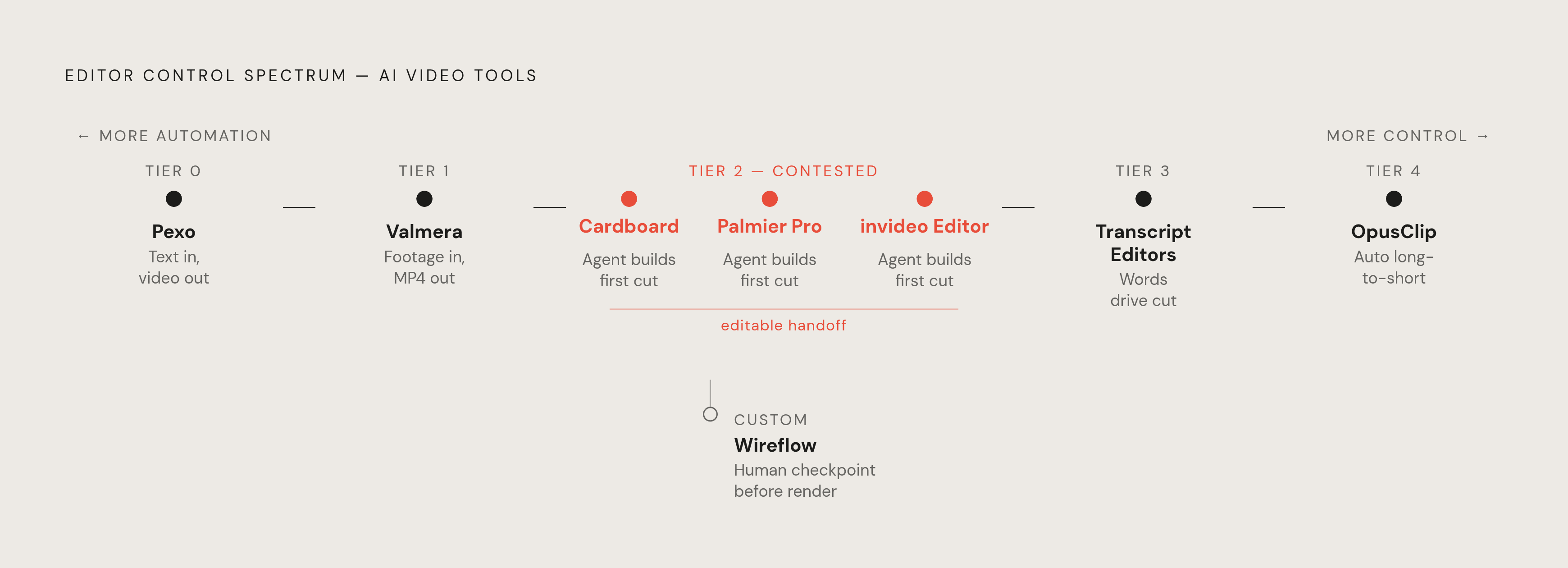
Tier 0 — Pexo — no footage, no timeline, describe a goal and receive a finished video
From a text description or script, it plans shots, generates them, sequences the result, composes audio, and returns an edited file. It is available as an installable skill inside Claude Code, OpenAI Codex, Cursor, and OpenClaw. There is no timeline shift to work afterward.
That makes Pexo a fit for explainers from a brief or social content from a URL when speed outranks footage authenticity. The tradeoff is editorial control after generation, because there is no timeline to art-direct. It is not the right fit for real people, real product footage, or a client-reviewable edit.
Tier 1 — Valmera — footage in, the agent edits end-to-end, finished MP4 out
Valmera keeps the hands-off workflow but starts with your recording. You upload footage and describe the edit in plain English, then its agent reads the word-level transcript and frames to make editorial decisions. It removes silences and filler words, adds word-timed captions, reframes to 9:16, and adds B-roll, music, and sound effects. It can also turn long videos into shorts. The agent renders a preview it checks itself before exporting a full-quality MP4 from the original file.
The output is a finished file. That suits social clips, quick demos, and work with a brief clear enough to entrust to an automated first pass. However, fixing a mistaken cut requires rerunning the agent. Projects that need sign-off on each cut, or need to keep specific moments exactly as they are, need more control than this workflow gives them. Self-checking is useful, but it is not client approval.
Tier 2a — Cardboard — agent builds an editable first cut, you refine it on the timeline or in chat
Cardboard changes what happens after the first draft. It builds an editable cut from a prompt, footage, or both, then allows refinement through its Director agent or directly on the timeline. Director is the key mechanism here because it accepts natural-language revisions after assembly. If the agent makes one wrong decision, that decision does not have to sink the whole cut.
The same project can include generated video, images, music, and sound effects, plus cloned voices and web B-roll. Voice cloning and web-sourced B-roll need the Creator plan or above. The editable handoff is still the central advantage, especially when feedback arrives after the first cut.
Tier 2b — Palmier Pro — a macOS editor built specifically so outside agents can operate it
Palmier Pro approaches the editable-first-cut workflow from the outside-agent direction. It was built for agents to operate, rather than having agent access added to an existing editor. Its MCP implementation lets outside agents search footage semantically, using what people say or what appears on screen to extend searches beyond filenames and timecodes. Palmier Pro requires macOS 26, also called Tahoe, and outside agents can reach it only while the app is open.
Releases through v0.7.6 remain GPLv3 and inspectable, but current binary releases from v0.7.7 onward are proprietary. The published source therefore describes an earlier version of the app, limiting what a team can inspect when designing an integration. “Formerly open-source” is not a spare key to the current engine room.
Tier 2c — invideo Editor — agent-first browser NLE where the timeline stays fully yours
invideo Editor offers the browser-based route to a professional multitrack timeline. It needs no install or license seats, resumes work across devices, and runs assigned jobs in the cloud. Its agents assemble the cut and do the repetitive work, and the editor still has frame-accurate control. The manual editor is free to use. Agents use credits when given work, so using the timeline and having agents do the work are paid for separately.
Its agent tasks include take selection, base cuts, silence and filler removal, chapter markers, scene reordering, cutdowns, dubs, and platform-format versions. Multicam work includes audio-anchored sync and speaker switching, while footage search can use people, actions, objects, and camera angles. Automated take selection still struggles with judging which performance is best. A beat-sync agent carries on a cut pattern after the first few beats are marked, while a reference-match agent uses another edit’s pacing, structure, and style to shape the cut from the supplied footage.
Finishing tools remain on that same timeline. The color suite includes wheels, curves, qualifiers, LUTs, and scopes, while the built-in DAW provides voice, music, and effects tracks, buses, dB faders, and loudness metering. Motion graphics and keyframe control with custom Bezier curves support detailed revisions. With branches, tags, and version history, an editor can try another cut and keep the main one as it is. Handoffs include audio-only exports, editable projects for Premiere Pro, Final Cut Pro, or DaVinci Resolve with cuts and layers intact, and browser review links with frame-accurate comments agents can pick up.
Tier 3 — Transcript-first editing — agents that operate on words, not clips
Deleting a word removes its video, while rearranging sentences moves the clips with them. There are no trim handles to negotiate. Since May 2026, transcript-first editors can connect to Claude over MCP, allowing those edits to run from a chat client without opening the editing app. This makes the approach accessible to non-editors without reducing it to a collection of one-click effects.
Podcasts, interviews, talking-head recordings, and courses all give the agent words it can use to organize the cut. A montage or music-driven product demo has no transcript that explains how its images fit together. B-roll-heavy sequences and motion graphics present the same mismatch. The practical pairing is a transcript-first dialogue pass followed by a visual pass in an NLE, rather than asking the transcript to explain a shot it cannot describe.
Tier 4 — OpusClip — autonomous long-to-short pipeline with no timeline input required
OpusClip automates a narrower job than a general editor. Given a YouTube video or podcast, it identifies engaging segments, turns them into vertical shorts, adds animated captions, and assigns predicted-virality scores. The user does not need to operate a timeline. Caption styling, B-roll selection, and music choice are decisions the tool makes within that pipeline. Its autonomy is substantial, but its scope is specific.
That makes OpusClip a fit for publishing from one long-form source to YouTube Shorts, TikTok, and Reels when volume and speed come first. A predicted-virality score is not a creative brief, however. Projects that need the same brand styling throughout, specific clips, or more post-production need more guidance than the tool’s output gives them. Creators who want the same look across their work often use the cut as a draft and rebuild the caption layer on its own.
Custom tier — Wireflow — build the agent yourself, with a human checkpoint before anything renders
Wireflow makes the editing pipeline an inspectable graph. Claude turns the brief into a shot plan, GPT Image 2.5 Flare renders a frame for someone to review for each shot, and Remotion does the composition. A human must approve the frames before composition runs. The expensive step therefore comes after the review. If one shot is wrong, the team can fix its node and rerun only that branch.
This is control by design. It suits agencies and teams producing repeatable formats where a wrong final render is costly and each step needs inspection. The tradeoff is setup, because building the pipeline takes an afternoon. Wireflow is not a one-button route to a quick short. For that job, Pexo or Valmera is the more appropriate starting point, while Wireflow earns its place when the approval checkpoint is part of production.
Which AI video editor fits your workflow without manual timeline work?
The practical choice starts with the material and the review process. With no footage and speed as the priority, Pexo fits. With existing footage, a clear brief, and an acceptable locked output, Valmera fits. Transcript-first editing fits work with lots of dialogue, while OpusClip fits long-form content that needs to become a large number of social clips. Repeatable production with costly mistakes points toward Wireflow.
Client review or refinement after assembly points toward Tier 2. Cardboard fits work that needs generated assets in the same project, Palmier Pro fits work where outside agents run the editor and macOS 26 is acceptable, and invideo Editor fits professional editing in a browser, including beat-sync and reference-match work, without a local install. There is also a practical way to connect generation and assembly. A generative tool’s MCP server and an editing tool’s MCP server can run in the same Claude Code session, so one conversation can generate the assets and assemble the edit, with review still deciding what ships.